Quick answer: To prevent transactional lead notifications, customer quotation alerts, and contact-form submissions from landing in spam or getting outright dropped by mailbox providers, businesses must configure a complete email authentication triad: SPF (Sender Policy Framework, RFC 7208) to authorize sending server IP addresses within the 10-DNS-lookup limit; DKIM (DomainKeys Identified Mail, RFC 6376) using 2048-bit RSA cryptographic keys to ensure tamper-proof message integrity; and DMARC (RFC 7489) to enforce identifier alignment between the visible From: header and the authenticated envelope domain, with a phased migration path from p=none to p=quarantine and p=reject. Furthermore, modern senders must maintain Google Postmaster Tools spam complaint rates strictly below 0.10% (under the 0.30% hard ceiling enforced by Google and Yahoo since 2024), deploy valid forward and reverse DNS (PTR) records, and isolate transactional messaging on dedicated subdomains away from bulk marketing campaigns.
When an entrepreneur or engineering team launches a new website or CRM automation, few operational failures are more costly than "silent deliverability death"—where high-value customer inquiries submit successfully through front-end forms, but internal dispatch notifications or automated client confirmations vanish into spam folders, junk filters, or get throttled at the network layer. Historically, email delivery was forgiving; today, receiving mail transfer agents (MTAs) at Google Workspace, Microsoft 365, Yahoo Mail, and enterprise secure email gateways (Proofpoint, Mimecast) enforce automated, algorithmic compliance checks that immediately discard unauthenticated or improperly aligned communications.
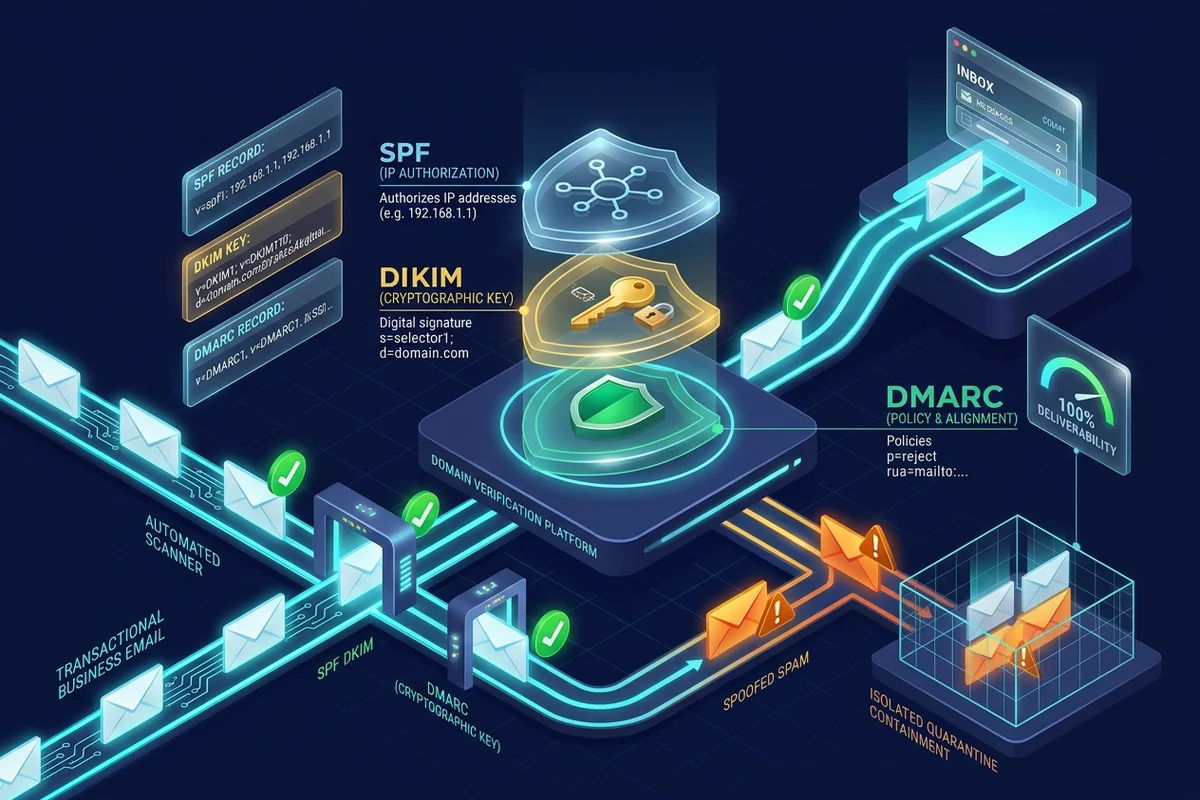
1. The Authentication Triad: How SPF, DKIM, and DMARC Work Together
To diagnose why business messages end up in spam, one must understand that the modern email protocol (SMTP, RFC 5321) was originally conceived without native authentication. Anyone could forge an email purporting to be from ceo@yourcompany.com. SPF, DKIM, and DMARC were developed as layered cryptographic and DNS-based defenses to verify sender identity, preserve message integrity, and instruct receivers on how to treat unauthorized traffic.
The three standards perform distinct, complementary roles in the verification pipeline:
| Authentication Standard | Primary Function | Underlying RFC | DNS Record Type & Location | Evaluation Mechanism | Consequence of Failure |
|---|---|---|---|---|---|
| SPF (Sender Policy Framework) |
Whitelists authorized server IP addresses permitted to send mail for a domain. | RFC 7208 | TXT at root or subdomain( @ or notify) |
Checks connecting server's IP address against the envelope return-path domain (RFC5321.MailFrom). |
Returns SoftFail (~all) or HardFail (-all). If DMARC is not aligned, receiver spam filters treat mail with high suspicion. |
| DKIM (DomainKeys Identified Mail) |
Provides cryptographic proof of message integrity and sender domain authenticity. | RFC 6376 | TXT or CNAME at selector location( selector._domainkey.domain.com) |
Sending MTA signs selected headers and body with private key; receiving MTA validates signature using published public key. | Signature fails if body or signed headers are modified in transit (e.g., mailing list footers, proxy re-encoding), dropping DKIM pass status. |
| DMARC (Message Authentication Reporting & Conformance) |
Enforces domain alignment between visible From: header and SPF/DKIM; defines receiver disposition policies. |
RFC 7489 | TXT at _dmarc.domain.com |
Verifies that at least one authenticated mechanism (SPF or DKIM) aligns with the visible From: header (RFC 5322). |
Receiving server applies domain owner's stated policy (p=none, p=quarantine, or p=reject) and generates aggregate XML reports. |
| BIMI (Brand Indicators for Message Identification) |
Displays verified organization brand logo in supporting mailbox provider inboxes (Gmail, Apple Mail, Yahoo). | RFC 8617 / AuthIndicators | TXT at default._bimi.domain.com |
Requires DMARC policy at p=quarantine (pct=100) or p=reject, and a Verified Mark Certificate (VMC) from a certified CA. |
No logo displayed; deliverability is not penalized, but brand trust and click-through rates are reduced. |
2. Deep-Dive DNS Configuration and Syntax Rules
A. Sender Policy Framework (SPF): Syntax, Modifiers, and the 10-Lookup Limit
An SPF record is a single string of text published in your domain's DNS zone as a TXT record. When a receiving mail server accepts an incoming SMTP connection, it extracts the domain from the MAIL FROM command (also known as the Return-Path or envelope sender) and queries DNS for its SPF record.
; Example Production SPF Record for a Domain Using Google Workspace and AWS SES
v=spf1 include:_spf.google.com include:amazonses.com ip4:192.0.2.45 ~all
SPF records are parsed from left to right according to strict syntax rules:
v=spf1: Identifies the version. Must appear at the very beginning of the record.include:: Triggers a recursive DNS lookup to evaluate the SPF policy of a third-party service provider (e.g., Google Workspace, AWS SES, Zendesk, Mailgun). Eachinclude:consumes one or more DNS lookups against the 10-lookup ceiling.ip4:/ip6:: Authorizes specific static IP addresses or CIDR blocks (e.g.,ip4:198.51.100.12/28). IP mechanisms do not require DNS queries and do not count against the 10-lookup limit.a/mx: Authorizes the IP addresses resolved from the domain's A or MX records. These mechanisms consume DNS lookups and should be replaced with explicitip4:mechanisms wherever feasible to conserve lookup budget.- All Qualifiers (
-allvs~all):~all(SoftFail): Informs the receiver that unlisted IPs are likely unauthorized, but requests acceptance with increased spam tagging. Recommended during DMARC monitoring phases and when third-party forwarders are active.-all(HardFail): Instructs the receiver to immediately reject mail from unlisted IPs. Highly secure, but can cause legitimate mail to bounce if automated forwarders (such as university or corporate auto-redirects) modify the envelope sender without updating SPF.
⚠️ The Critical 10-DNS-Lookup Pitfall
Under RFC 7208 Section 4.6.4, the number of mechanisms and modifiers that do DNS lookups must not exceed 10 per evaluation. Mechanisms that count include: include, a, mx, ptr, exists, and redirect. If an SPF record exceeds 10 lookups, receiving servers instantly abort evaluation and return PermError (Permanent Error). When an SPF record returns PermError, it fails SPF validation completely, causing DMARC checks to fail as well. If your business uses multiple SaaS tools, use SPF flattening techniques or dedicated subdomains to keep lookup counts below 7.
B. DomainKeys Identified Mail (DKIM): 2048-bit Cryptographic Signing
While SPF authenticates the sending server's IP address, DKIM authenticates the email message itself using asymmetric public-key cryptography (RFC 6376). When your mail server or transactional API generates an email, it computes a cryptographic hash of the message body and selected canonicalized headers (including From, To, Subject, Date, and Message-ID), signs that hash using its private key, and inserts an DKIM-Signature header into the message.
DKIM-Signature: v=1; a=rsa-sha256; c=relaxed/relaxed; d=waveino.com; s=k1;
    t=1731142800; bh=47DEQpj8HBSa+/TImW+5JCeuQeRkm5NMpJWZG3hSuFU=;
    h=From:To:Subject:Date:Message-ID:Content-Type;
    b=dGhpc2lzYW5leGFtcGxlc2lnbmF0dXJldGhhdHByb3Zlc21lc3NhZ2VpbnRlZ3JpdHk...
The receiving server reads the selector tag (s=k1) and the domain tag (d=waveino.com), performs a DNS query for the public key published at k1._domainkey.waveino.com, and decrypts the hash. If the decrypted hash matches the recomputed hash of the received message, the receiver is guaranteed that the email originated from an authorized sender and was not altered in transit.
- Key Length (2048-bit RSA): Older 1024-bit RSA keys are deprecated by Google and major providers due to factoring vulnerabilities. Modern senders must deploy 2048-bit RSA keys or Ed25519 elliptic-curve signatures. Note that 2048-bit keys require strings longer than 255 characters, necessitating split strings in DNS BIND/TXT syntax (e.g.,
"v=DKIM1; k=rsa; p=MIIBIjAN..." "IDAQAB"). - Canonicalization (
c=relaxed/relaxed): Canonicalization specifies how algorithms handle minor whitespace and formatting modifications introduced by intermediate mail hops. Settingrelaxed/relaxedprevents DKIM signature breakage caused by benign MTA whitespace folding or line-ending conversions. - Selector Rotation: Maintain at least two selectors (e.g.,
s1ands2) to allow seamless annual key rotation without service interruption.
C. DMARC: Identifier Alignment and Policy Enforcement
DMARC solves the historic vulnerability of SPF and DKIM: neither standard originally required that the domain authenticated in the background match the human-visible From: address in the recipient's inbox. A malicious actor could send an email with a visible header of From: ceo@yourcompany.com while authenticating SPF against evil-server.net. DMARC bridges this gap by mandating Identifier Alignment.
DMARC Policy Stages (The Safe Rollout Roadmap)
Deploying DMARC with immediate strict rejection (p=reject) without prior monitoring is an operational hazard that frequently breaks legitimate third-party sending services (such as invoicing platforms, transactional website forms, and help desks). Follow this three-stage phased deployment roadmap:
- Phase 1: Monitoring & Discovery (
p=none)_dmarc.waveino.com. IN TXT "v=DMARC1; p=none; rua=mailto:dmarc-reports@waveino.com; pct=100; sp=none; aspf=r; adkim=r"In this phase, no legitimate or illegitimate emails are blocked. The receiving MTAs generate daily XML aggregate reports sent to your
ruaaddress detailing all IP addresses sending mail on behalf of your domain, and whether they passed SPF, DKIM, and alignment. Analyze these reports using tools like dmarcian, Postmark DMARC Monitor, or Valimail to uncover unauthenticated services. - Phase 2: Quarantine Enforcement (
p=quarantine)_dmarc.waveino.com. IN TXT "v=DMARC1; p=quarantine; pct=25; rua=mailto:dmarc-reports@waveino.com; aspf=r; adkim=r"Once all legitimate sending sources are authenticated and aligned, migrate to quarantine mode with a percentage rollout (
pct=25, increasing topct=50, thenpct=100). Unaligned emails are diverted to the recipient's spam/junk folder rather than delivered to the primary inbox. - Phase 3: Strict Rejection (
p=reject)_dmarc.waveino.com. IN TXT "v=DMARC1; p=reject; rua=mailto:dmarc-reports@waveino.com; ruf=mailto:dmarc-forensics@waveino.com; aspf=r; adkim=r"The gold standard of domain defense. Any email failing DMARC alignment is rejected at the SMTP protocol level (bounced before delivery). This eliminates domain spoofing, protects brand equity, and fulfills the prerequisite for displaying verified brand logos via BIMI.
3. Google Workspace & Yahoo Mail 2024+ Mandatory Sender Requirements
In early 2024, Google and Yahoo jointly implemented rigorous, mandatory email defense standards. Non-compliant domains face automated delivery degradation, starting with temporary SMTP error deferrals and progressing to outright delivery rejection.
| Enforcement Area | Requirement for All Senders | Requirement for Bulk Senders (≥5,000 msgs/day) | Diagnostic Tool / Metric |
|---|---|---|---|
| Authentication Protocols | Must have valid SPF or DKIM deployed. | Must deploy both SPF and DKIM, plus a published DMARC policy. | MXToolbox SuperTool, Google Postmaster Tools |
| DMARC Alignment | Recommended. | Strictly Mandatory: The domain in the visible From: header must align with either SPF domain or DKIM d= domain. |
DMARC Analyzer, Header Inspection |
| Spam Rate Ceiling | Must keep spam complaint rate below 0.30%; recommended below 0.10%. | Must keep spam complaint rate strictly below 0.30%; zero tolerance for prolonged spikes. | Google Postmaster Tools Spam Rate Dashboard |
| Unsubscribe Mechanism | Visible unsubscribe link in body for marketing/newsletters. | Mandatory RFC 8058 One-Click Unsubscribe: Must include List-Unsubscribe and List-Unsubscribe-Post headers processed within 48 hours. |
Raw Email Header Verification |
| DNS Infrastructure | Valid Forward and Reverse DNS (rDNS/PTR records) linking sending IP to domain. | Valid Forward and Reverse DNS (PTR records) with consistent HELO/EHLO hostnames. | dig -x <sending-ip>, PTR check |
| Transmission Security | TLS connection required for message transmission. | Mandatory TLS connection with cipher suite compliance. | MTA-STS, STARTTLS validation |
4. The Danger of Local Server Mail: Why PHP mail() Destroys Deliverability
A staggering percentage of small-to-medium business websites use default server mailers—such as PHP's built-in mail() function, WordPress wp_mail() without an SMTP plugin, or direct sendmail calls from a Node.js web server. This approach is an architectural dead-end for multiple reasons:
- Dirty Shared IP Reputation: Standard shared hosting servers or cheap VPS instances run hundreds of unrelated websites from the same public IP address. If a single compromised tenant sends spam, the server's IP is blacklisted across Spamhaus, Barracuda, and SORBS, silently blacklisting your enquiry alerts.
- Missing Reverse DNS (PTR Records): Mailbox providers reject connections from IPs whose PTR records do not resolve back to the hostname specified in the SMTP
EHLO/HELOhandshake (e.g., residential broadband IP ranges or unconfigured generic hostnames likevps-123456.hostingprovider.com). - Zero Asynchronous Queuing: Synchronously dispatching an email during an HTTP request cycle blocks the Node.js or PHP worker thread. If the SMTP server experiences network latency or connection timeout, the user's web browser hangs, resulting in HTTP 504 Gateway Timeouts and lost inquiries.
- No Delivery Telemetry: Default server mail functions provide zero visibility into delivery status, soft bounces, hard bounces, spam complaints, or open rates. When an alert fails, it fails silently into the server's
/var/log/mail.logwithout alerting your operations team.
5. Production Architecture: Building Resilient Lead Routing and Notification Pipelines
To eliminate lost leads and achieve 99.9%+ transactional email deliverability, engineering teams must separate database persistence from email delivery and route all notifications through specialized transactional API gateways (e.g., AWS SES, Resend, Postmark, or SendGrid).
A. Architectural Principles for Reliable Lead Delivery
- 1. ACID Database Write First: When a customer submits a contact form, request a quote, or books a consultation, your backend must write the lead data to an ACID-compliant database table (e.g., MySQL
leadstable) inside an atomic transaction. Only after the database transaction commits successfully should the HTTP response return success to the customer. This ensures that even if email infrastructure fails completely, zero customer leads are ever lost. - 2. Decouple via Asynchronous Queue (BullMQ / Redis): Push the notification task as a serialized job to a resilient job queue. Background worker processes handle SMTP connection handshakes, rate limiting, and exponential backoff retries without impacting user response times.
- 3. Stream Separation (Subdomain Isolation): Never send transactional notifications from the same domain or IP pool used for cold outreach or promotional newsletters. Configure a dedicated subdomain for transactional mail:
- Corporate Staff Mail:
yourcompany.com(Google Workspace / Microsoft 365) - Transactional Lead Alerts:
notify.yourcompany.comortransact.yourcompany.com(Postmark / AWS SES) - Marketing Newsletters:
news.yourcompany.comormail.yourcompany.com(Klaviyo / Mailchimp)
- Corporate Staff Mail:
- 4. Webhook Ingestion for Bounce & Complaint Processing: Configure inbound webhooks from your transactional provider to automatically record hard bounces (invalid email addresses) and unsubscribes in your database, preventing your system from repeatedly attempting delivery to dead mailboxes.
B. Reference Node.js Implementation: Asynchronous Dispatch with Nodemailer & SES
Below is a production-grade implementation pattern demonstrating authenticated transactional email dispatch utilizing Node.js, Nodemailer, and Amazon SES (or any RFC-compliant SMTP/API gateway) with strict header compliance:
// services/transactionalEmailService.js
const nodemailer = require('nodemailer');

// Configure authenticated transporter using dedicated transactional credentials
const transporter = nodemailer.createTransport({
  host: process.env.SMTP_HOST, // e.g., email-smtp.us-east-1.amazonaws.com
  port: 587,
  secure: false, // true for 465, false for 587 with STARTTLS
  requireTLS: true,
  auth: {
    user: process.env.SMTP_USER,
    pass: process.env.SMTP_PASSWORD
  },
  pool: true,
  maxConnections: 5,
  maxMessages: 100
});

/**
 * Dispatches an authenticated transactional lead notification.
 * Ensures RFC 5322 header alignment and proper envelope sender configuration.
 */
async function sendLeadNotification({ leadId, customerName, customerEmail, serviceRequested, message }) {
  const mailOptions = {
    // Envelope sender (Return-Path) aligns with SPF record on notify.waveino.com
    envelope: {
      from: 'bounces@notify.waveino.com',
      to: process.env.LEAD_NOTIFICATION_INBOX
    },
    // Visible From header aligns with DKIM signing domain on notify.waveino.com
    from: '"WaveINO Lead Desk" <alerts@notify.waveino.com>',
    to: process.env.LEAD_NOTIFICATION_INBOX, // e.g., leads@waveino.com
    replyTo: `"${customerName}" <${customerEmail}>`, // Enables 1-click staff replies directly to client
    subject: `[New Lead #${leadId}] ${serviceRequested} Enquiry - ${customerName}`,
    headers: {
      'X-Lead-ID': String(leadId),
      'X-Entity-Ref-ID': `lead-${leadId}-${Date.now()}`,
      'Auto-Submitted': 'auto-generated', // Informs receiving vacation auto-responders not to loop
      'X-Priority': '1 (Highest)'
    },
    text: `New lead received from ${customerName} (${customerEmail}) for ${serviceRequested}:\n\n${message}\n\nLead ID: ${leadId}`,
    html: `
      <div style="font-family: Arial, sans-serif; max-width: 600px; margin: 0 auto; padding: 20px; border: 1px solid #e2e8f0; border-radius: 8px;">
        <h2 style="color: #1e293b; margin-top: 0;">New Inbound Service Enquiry</h2>
        <p><strong>Customer:</strong> ${customerName}</p>
        <p><strong>Email:</strong> <a href="mailto:${customerEmail}">${customerEmail}</a></p>
        <p><strong>Service Requested:</strong> ${serviceRequested}</p>
        <hr style="border: none; border-top: 1px solid #e2e8f0; margin: 15px 0;" />
        <p><strong>Project Details:</strong></p>
        <div style="background-color: #f8fafc; padding: 12px; border-radius: 4px; font-size: 14px;">${message}</div>
        <p style="color: #64748b; font-size: 12px; margin-top: 20px;">Lead ID: ${leadId} | Dispatched via Authenticated Transactional Pipeline</p>
      </div>
    `
  };

  const info = await transporter.sendMail(mailOptions);
  return { success: true, messageId: info.messageId };
}

module.exports = { sendLeadNotification };
6. Step-by-Step Deliverability Testing & Diagnostic Checklist
Before launching a new website, domain migration, or CRM automation, execute this structured 7-step deliverability audit to ensure zero delivery interruptions:
| Step | Audit Action | Target Outcome / Benchmark | Verification Tool |
|---|---|---|---|
| 1 | Verify SPF Syntax & Lookup Count | Exactly 1 record, total DNS lookups ≤ 10, valid mechanisms, ~all or -all qualifier. |
MXToolbox SPF Check |
| 2 | Validate DKIM 2048-bit Key & Selector | Public key resolved in DNS zone, matching private key on MTA, 2048-bit length, no truncated keys. | DMARC Analyzer DKIM Validator |
| 3 | Verify DMARC Record & Alignment | Record published at _dmarc.<domain>, valid rua mailto destination, alignment confirmed. |
dmarcian DMARC Inspector |
| 4 | Forward & Reverse DNS (PTR) Matching | Sending IP resolves to PTR record whose A-record matches the connecting hostname. | dig -x <IP> +short / DNSLookup |
| 5 | Inspect Live Headers (Authentication-Results) | Send test email to personal Gmail & Outlook accounts; inspect raw headers for spf=pass, dkim=pass, dmarc=pass. |
Gmail "Show Original", Outlook "View Message Details" |
| 6 | End-to-End Spam Score Evaluation | Achieve score of 10/10 on Mail-Tester; zero blacklists, correct message formatting. | Mail-Tester |
| 7 | Enroll in Postmaster Tools & Feedback Loops | Domain verified in Google Postmaster Tools; spam rate tracked at <0.10%; Yahoo/Cisco FBL enrolled. | Google Postmaster Tools |
7. Analyzing Real Raw Email Headers: Spotting Authentication Failures
When an email lands in spam, the answer is always embedded in the raw email headers. Open the message in Gmail, click the three vertical dots, and select "Show Original". Look specifically for the Authentication-Results header generated by Google's receiving MX servers:
; Example of a PERFECT Authenticated Message Header (Passed All Checks)
Authentication-Results: mx.google.com;
       dkim=pass header.i=@notify.waveino.com header.s=k1 header.b=O4Z3xY;
       spf=pass (google.com: domain of bounces@notify.waveino.com designates 198.51.100.25 as permitted sender) smtp.mailfrom=bounces@notify.waveino.com;
       dmarc=pass (p=REJECT sp=REJECT dis=none) header.from=notify.waveino.com

; Example of a FAILED Authenticated Message Header (Triggering Spam Filters)
Authentication-Results: mx.google.com;
       dkim=neutral (bad sig) header.i=@waveino.com header.s=default header.b=98fA;
       spf=softfail (google.com: domain of transitioning contact@waveino.com does not designate 203.0.113.10 as permitted sender) smtp.mailfrom=contact@waveino.com;
       dmarc=fail (p=NONE dis=none) header.from=waveino.com
In the failed example above, three catastrophic bugs occurred simultaneously: the local server IP (203.0.113.10) was missing from the SPF record (resulting in spf=softfail); the DKIM signature was corrupted by server middleware modifying whitespace (resulting in dkim=neutral (bad sig)); and because neither mechanism passed with identifier alignment, DMARC failed with dmarc=fail. Modern spam filters will immediately route such a message to junk.
8. Frequently Asked Questions (Deliverability, DMARC, and Form Routing)
Can I have more than one SPF TXT record for my domain?
No. RFC 7208 Section 3.2 explicitly mandates that a domain must not publish more than one SPF record. If a receiving server discovers multiple TXT records starting with v=spf1, it immediately aborts evaluation and returns a PermError. All authorized sending services must be combined into a single coherent record (e.g., v=spf1 include:_spf.google.com include:amazonses.com ~all).
Why did our contact form alerts stop arriving after implementing DMARC p=reject?
This common failure occurs when contact form plugins or scripts spoof the customer's email address in the visible From: header (e.g., setting From: customer@gmail.com so the business can easily hit "Reply"). Because your web server is not authorized by Google to send mail on behalf of gmail.com, Gmail's strict DMARC policy causes your internal mail server to reject the alert. To resolve this, always set the From: header to your own authenticated domain (e.g., From: alerts@notify.yourdomain.com) and place the customer's email address in the Reply-To: header.
What is the difference between DMARC aggregate (rua) and forensic (ruf) reports?
Aggregate reports (rua) are daily XML summaries containing statistical data on all IP addresses sending mail under your domain, total message counts, and pass/fail rates for SPF, DKIM, and alignment. Forensic reports (ruf), also called Failure Reports, are real-time alerts generated immediately when an individual message fails DMARC evaluation, containing message headers and failure codes. Most mailbox providers (including Gmail) have deprecated ruf due to PII privacy concerns, making rua aggregate reporting the primary standard for monitoring.
Does achieving 100% SPF, DKIM, and DMARC pass guarantee inbox delivery?
No. Authentication is a prerequisite for deliverability, not a guarantee. Mailbox algorithms also evaluate domain reputation, IP reputation, user engagement (opens, replies, forwards), spam complaint rates, bounce rates, and message content heuristics. Even a perfectly authenticated email will be directed to spam if sending volume spikes abruptly without proper IP warming, or if recipients repeatedly mark messages as junk.
How should a growing business separate marketing from transactional email?
Best practices dictate segregating traffic across distinct subdomains and IP pools. Use notify.yourdomain.com for password resets, order receipts, and contact form alerts; use news.yourdomain.com for newsletters and product promotions. This safeguards critical operational communications from being disrupted by bulk campaign performance fluctuations.
Make Your Business Communications Dependable and Traceable
Securing your email deliverability is not merely an IT maintenance task; it is a fundamental revenue protection discipline. At WaveINO, we architect robust web applications, CRM workflows, and transactional automation infrastructure that ensure customer inquiries are captured persistently, processed reliably, and delivered without fail.
Explore our engineering capabilities across Web Development, Custom Software Solutions, and Workflow Automation. For additional deep dives into backend reliability, review our guides on Payment Gateway Webhook Reconciliation, Website Forms and Lead Routing Architecture, and Multi-Channel Lead Deduplication Rules.
Is your business experiencing dropped contact form alerts or emails landing in spam? Contact the WaveINO engineering team today to conduct an end-to-end audit of your domain authentication, DNS records, and transactional email infrastructure.